 BinanceHub
How to Sign Up for Binance
It usually takes 5–10 minutes from registration to identity verification. The most important steps are selecting YES at step 3 and entering referral ID WWI48BCL at step 4. If you miss either, you won't be able to receive payback later.
- Referral ID
WWI48BCL- Payback
- USDⓈ-M Futures Fee 20%
- Processing Time
- About 5–10 minutes
Prepare Before Signing Up
- An email address or phone number to use for sign-up (not previously used on Binance)
- Original ID in your name (resident registration card recommended; driver's license or passport also accepted)
- A mobile phone or PC with a camera (for facial verification)
-
 STEP 01
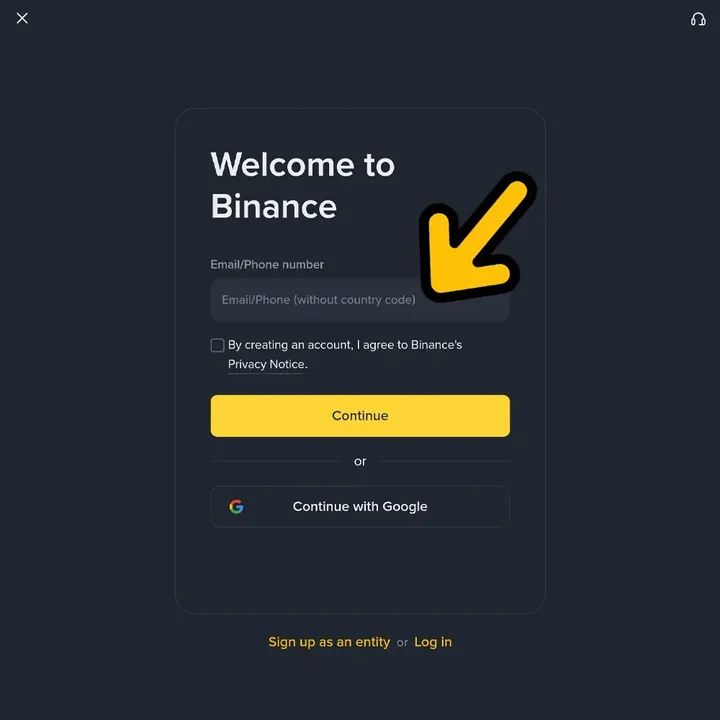
Enter email or phone number
Click the sign-up button below to open the Binance registration screen, then enter your email or phone number. Check the terms box and click Continue; you'll receive a verification code to enter.
- Enter your mobile number starting with 010, without the country code (+82).
- To sign up with your Google account, you can use Continue with Google at the bottom of the screen.
-
 STEP 02
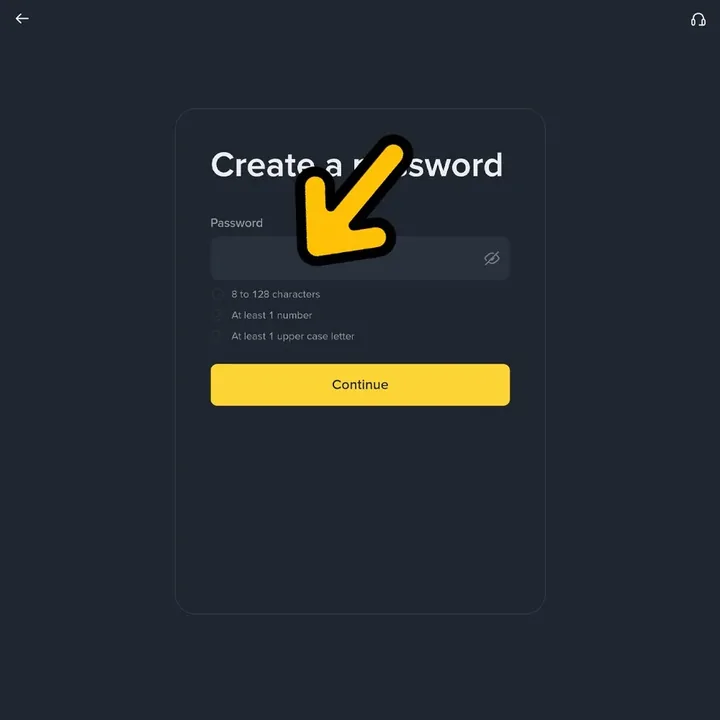
Set password
Set a password for login. You must include 8–128 characters, at least one number, and at least one uppercase letter to proceed.
- Avoid using passwords from other sites and create a unique password for the exchange.
-
 STEP 03
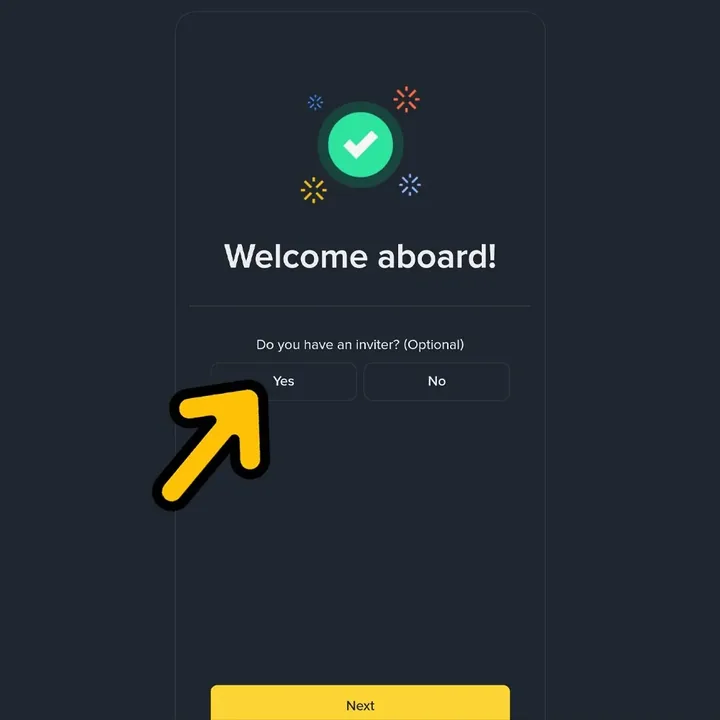
Selected YES on "Do you have an inviter?"
After signing up, a Welcome aboard! screen will appear and ask if you have a referrer. You must click Yes here. If you click No, you can't add a referral to this account later and payback won't apply.
- Even if it says (Optional), you must select Yes to receive payback.
- This window appears only once. Please be careful not to close it by mistake.
-
 STEP 04
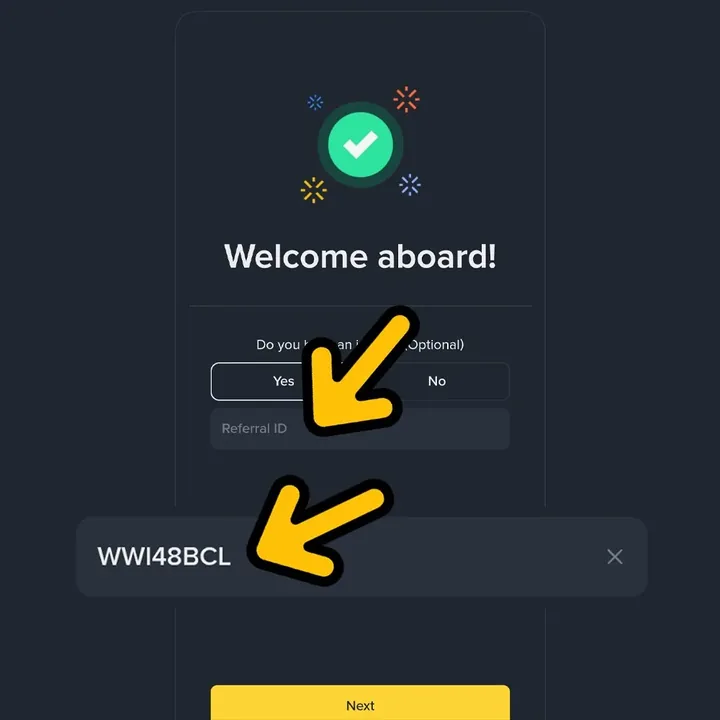
Check Referral ID WWI48BCL
When you click Yes, the Referral ID field will appear. Make sure WWI48BCL is entered correctly. If it's empty, enter it manually and click Next.
- All uppercase: WWI48BCL (W·W·I·4·8·B·C·L).
- If you enter through the sign-up button on this page, most fields will be filled in automatically.
-
 STEP 05
Start identity verification (KYC)
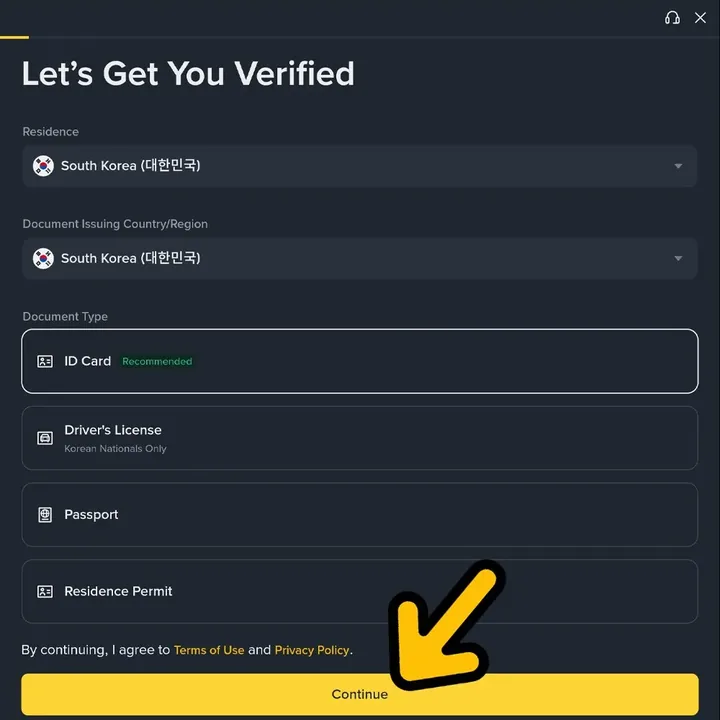
Next, you'll see the Let's Get You Verified screen. Select both your country of residence and ID issuing country as South Korea, choose the type of ID to use, and click Continue.
- ID Card verification is recommended and is usually the fastest to approve.
- Driver's licenses can only be used by Korean nationals.
-
 STEP 06
Take or upload ID photo
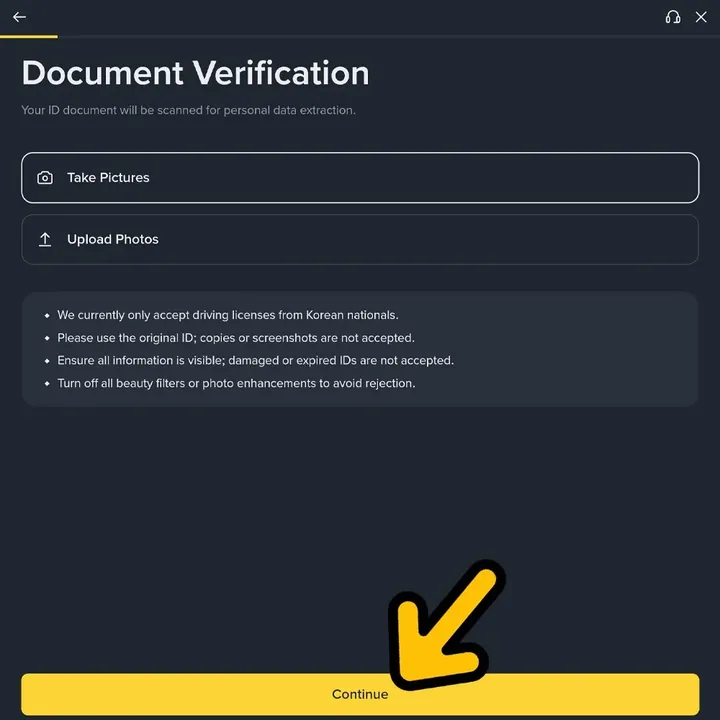
Choose whether to take a photo of your ID (Take Pictures) or upload a saved photo (Upload Photos), then follow the instructions to submit both the front and back.
- Only original IDs are accepted. Copies or screenshots will be rejected.
- Take photos so that the text is clear in a well-lit area, and turn off all correction filters.
-
 STEP 07
Finish with facial verification (Liveness Check)
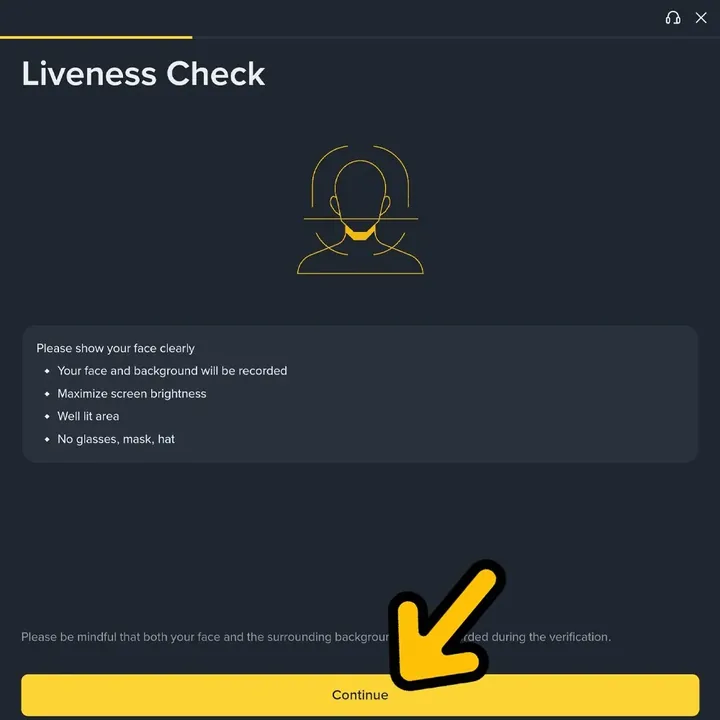
Finally, on the Liveness Check screen, follow the instructions and show your face to the camera to complete your application. Once your verification is approved, you can start deposits, withdrawals, and trading.
- Remove glasses, masks, and hats before proceeding.
- Set your screen brightness to maximum and verify under bright lighting for the best chance of passing on the first try.
If you've completed sign-up
- Check UIDOn the Binance app, tap your profile at the top right. Your UID is the number below your nickname.
- Link UID to sigbtcConnect your exchange UID on sigbtc My Page to register for payback eligibility.
- Trade & Get PaybackTrade USDⓈ-M futures and get 20% of your fees back as payback. Settlement method and schedule follow sigbtc's instructions.
Frequently Asked Questions
I already have a Binance account. Can I receive payback?
You can't add a referral ID to an existing account later. You must sign up again with a new email or phone number not previously used on Binance and complete KYC for payback to apply.
Pressed No on "Do you have an inviter?"
You can't add a referral to that account again. You must delete the account, wait 24 hours, and sign up again with a new email or phone number. If you have trouble, contact sigbtc 1:1 support.
How can I check if the Referral ID WWI48BCL was entered correctly?
During sign-up, just check if the Referral ID field is displayed after clicking Yes. After signing up, you can also check it in the Referrals menu on your Binance My Page.
Is identity verification (KYC) required?
Yes. KYC is required for deposits, withdrawals, and trading. With a national ID, it usually takes just a few minutes, and you must complete verification to start trading and earning payback.
Can I use Binance from Korea?
Traders residing in Korea can also register and trade after completing identity verification. However, as exchange policies and regulations may change, please check which features are available after signing up.
How much payback do I get?
It's 20% of USDⓈ-M futures trading fees. For example, if you trade 1 million USDT in futures at market price in a month, you'll get back 100 USDT out of 500 USDT in fees. Spot trading is not eligible.
Last updated · If you encounter any issues, please contact sigbtc Telegram Support with a screenshot of your current screen.